 ruly
Everything the app does, screen by screen
Every feature described here exists in the app today. The screenshots come from the app, with fictitious companies and figures.
Strategies
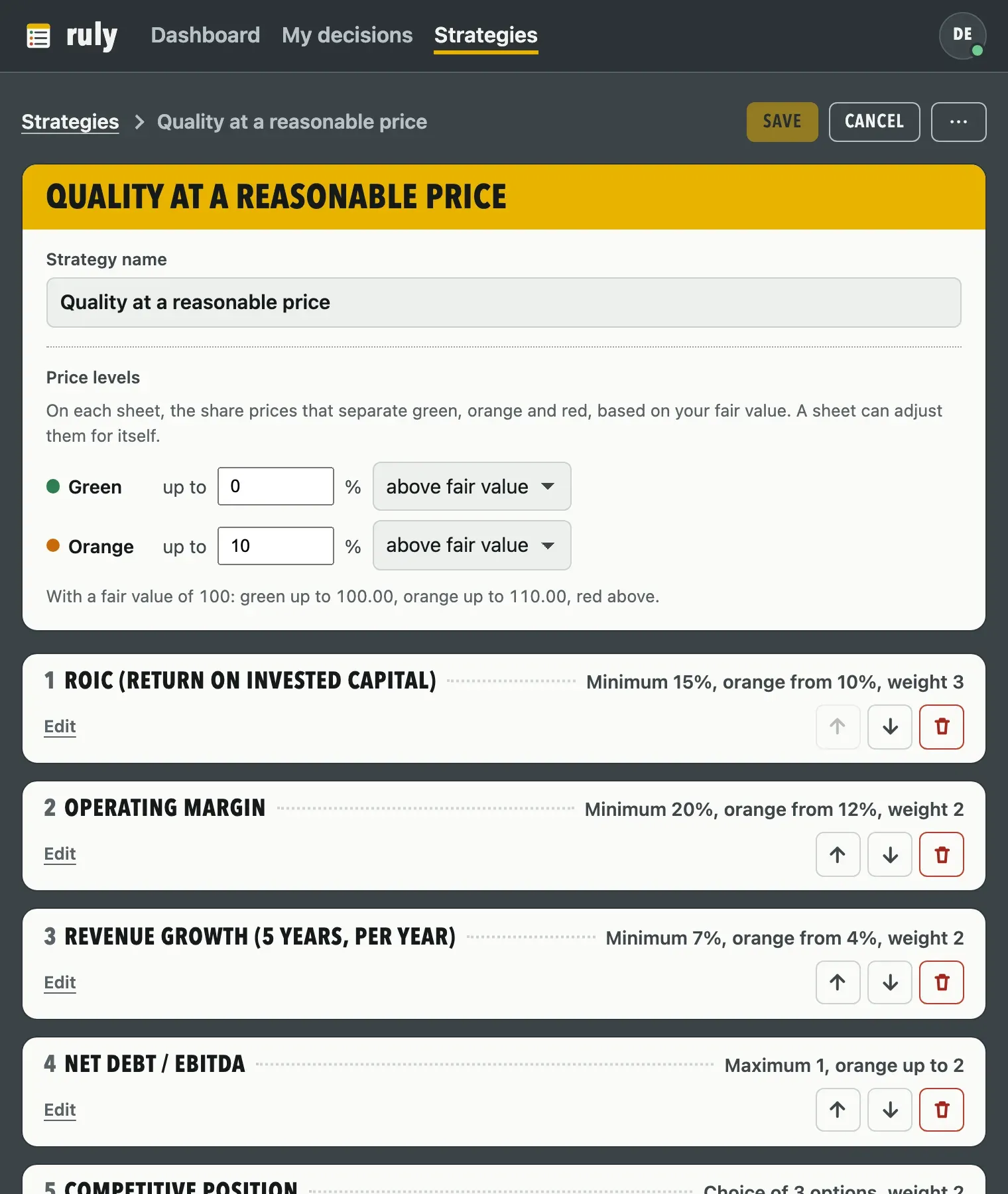
A strategy is the list of criteria and thresholds used to score your sheets. You use a preset one as it is, or you build your own.
-
Four preset strategies
Long-term quality, growing dividend, value and reasonable growth, read-only. Their thresholds are widely used benchmarks, not rules.
-
Duplicate to adapt
The copy goes to My strategies: you rename it, change its thresholds, add or remove criteria, without touching the original.
-
Start from scratch
A blank strategy, up to 30 criteria, in the order you choose.
-
Seven types of criteria
Minimum threshold, maximum threshold, range, yes or no, choice (up to eight options ranked green, orange or red), calculated value, free text never scored.
-
Weight and orange threshold
Each criterion weighs from 1 to 5 in the score. A second, optional threshold opens an orange zone to monitor.
-
Calculated values
Ratio, product, sum or gap of two inputs. An input can be your fair value, entered at the top of the sheet, or the share price.
-
A strategy that evolves
Editing a strategy updates all its sheets. Versions already frozen keep the criteria as of their date. An inconsistent strategy is not saved.
Sheets
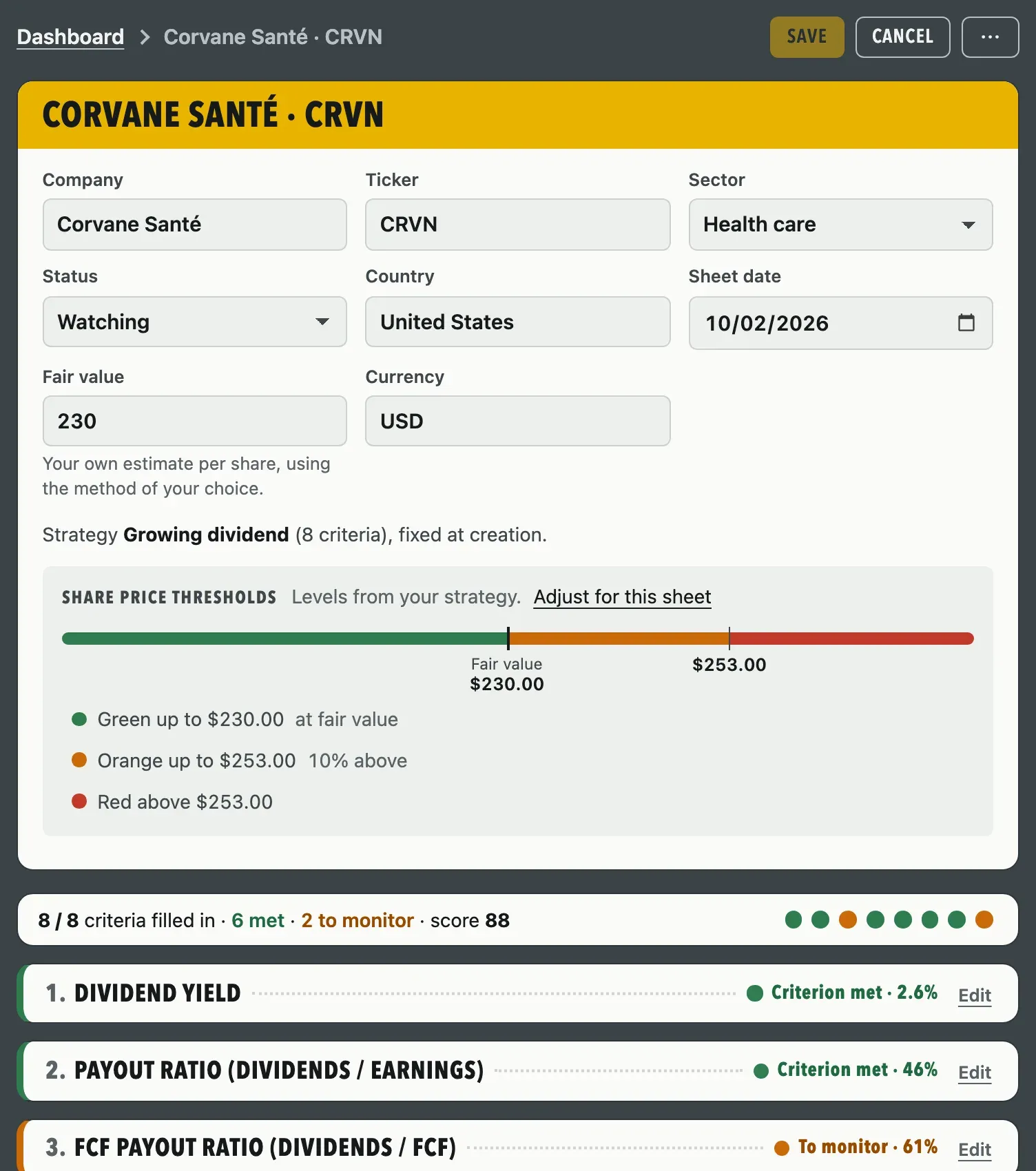
One sheet per company. You enter the figures, each criterion gets its verdict, and you note your thesis and your decision.
-
Created in three steps
Strategy, company, data entry. The strategy is set when the sheet is created.
-
Header
Name, ticker, sector (eleven groups), tracking status (candidate, watching, in portfolio, set aside), country, date, fair value and currency.
-
One verdict per criterion
Criterion met, to monitor or not met, recalculated as you type. A criterion with no value stays not filled in.
-
Weighted score out of 100
Green 2 points, orange 1, red 0, multiplied by the weight of the criterion. Calculated once the sheet is complete.
-
Not applicable
A box takes a criterion out of the score and the progress, for example gross margin for a bank.
-
Thesis, risks, decision
Three text fields, then your decision, one of five, from “I’m buying as a priority” to “I’m passing”, or “Not decided yet”. The decision does not count in the score.
-
Save, cancel, print
The sheet is saved when you click. Leaving with unsaved changes asks for confirmation. Each sheet prints on a page that reads well.
Frozen versions
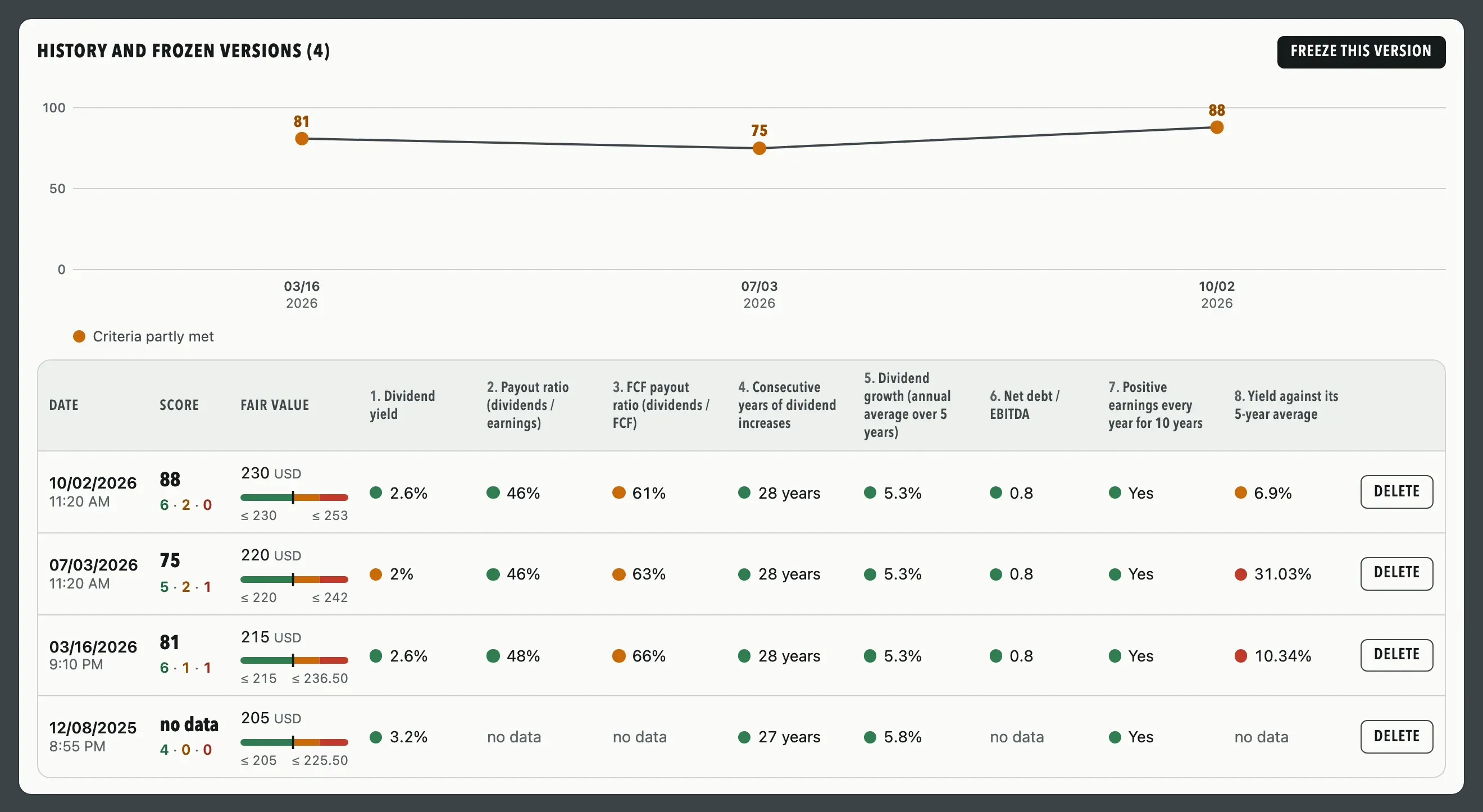
A frozen version is a dated snapshot of the sheet, which you take when you decide to, for example after an earnings release. Unlimited plan.
-
A complete snapshot
Score, verdict and value of each criterion, with a copy of the strategy as of that day.
-
The score curve
From three versions on. Each point carries its score and date, in green, red or grey depending on the verdict.
-
A table of versions
One row per version, one column per criterion. If the criteria changed between two versions, one table per version of the criteria.
-
Forty versions per sheet
Beyond that, the oldest ones are removed. A version can be deleted on its own, without touching the rest.
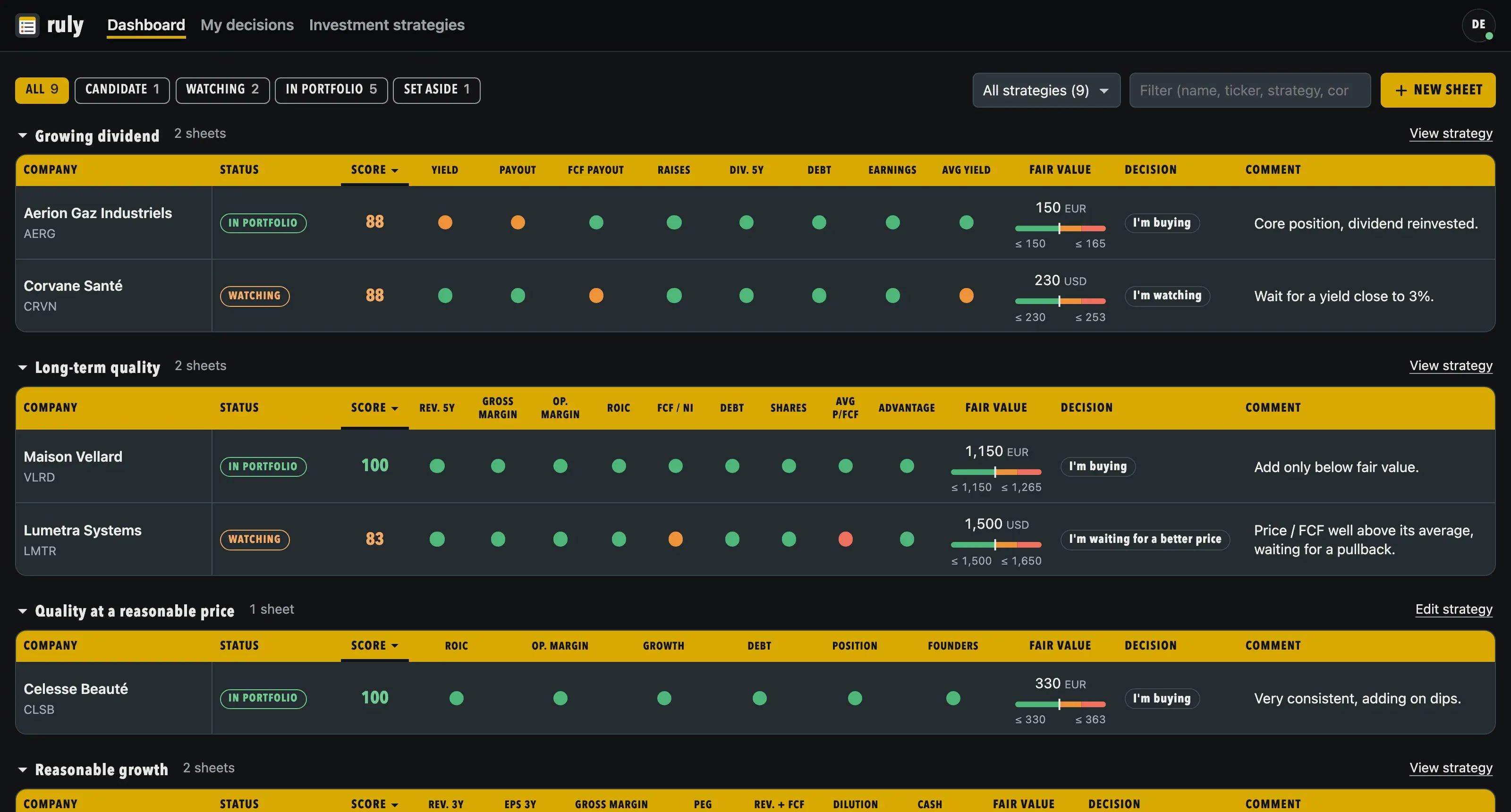
Dashboard
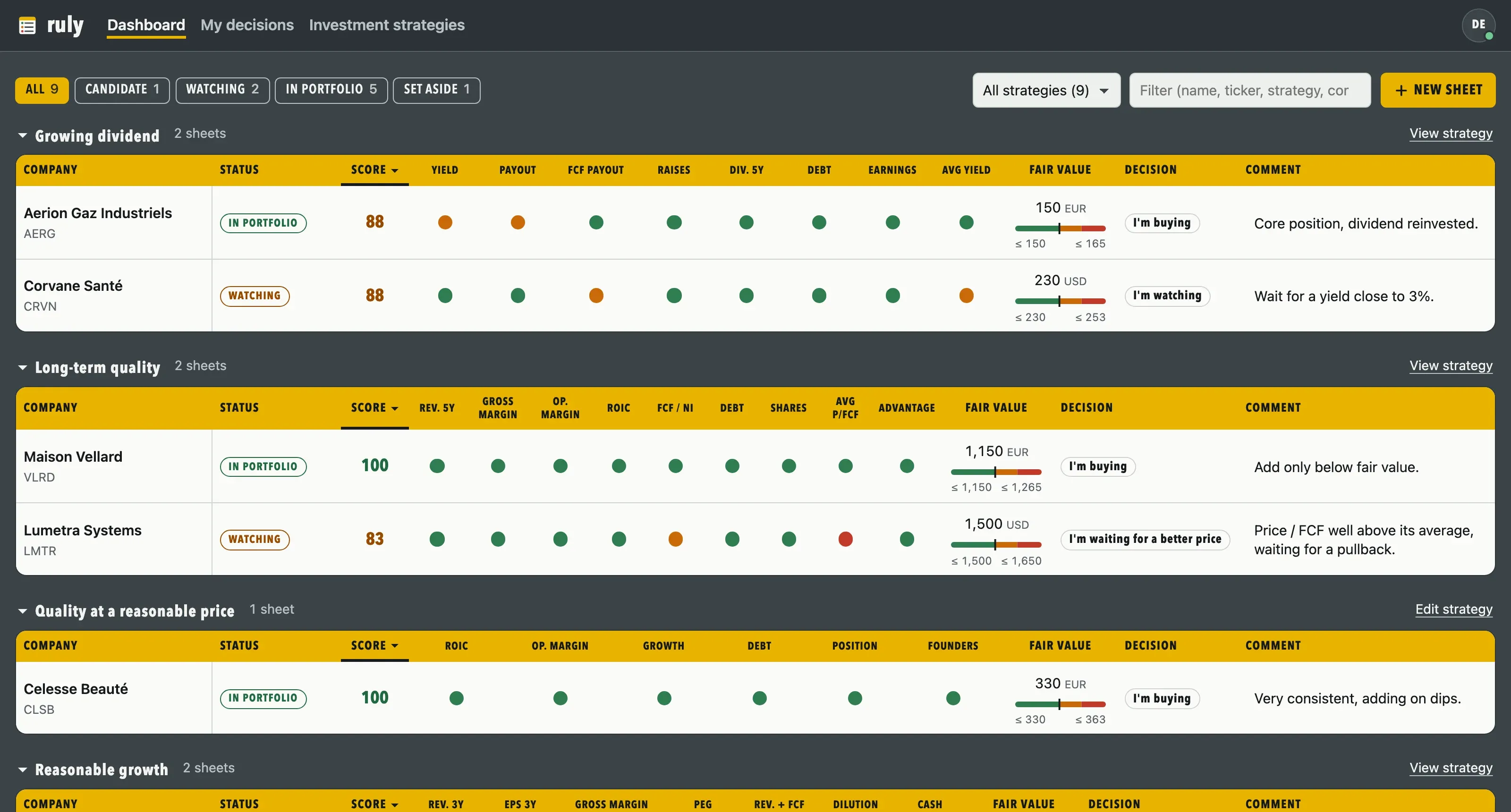
All your sheets, one section per strategy, one row per company.
-
One dot per criterion
With the company, the status, the score, your fair value, your decision and your comment. Hovering over the header recalls the criterion and its rule.
-
Filters and search
By status, with the number of sheets in each, by strategy, and by name, ticker, strategy or comment.
-
Sort by column
Company, status, score or decision. A second click reverses the order.
-
Comment in place
You edit it in the table, and it is saved as soon as you leave the field.
My decisions
All your sheets grouped by decision, under colored bands. A page next to the dashboard, with its strategy filter and its search.
-
One row per decision
“I’m buying as a priority”, “I’m buying”, “I’m watching”, “I’m waiting for a better price”, “I’m passing”, then the sheets not decided yet. In each row, highest score first.
-
Drag and drop
Drag a sheet to another row: its decision changes and is saved in the sheet. “Cancel” restores the previous decision.
-
With the keyboard too
Pick a sheet, then “Move here” on the row you want. Escape cancels the choice.
-
Each sheet at a glance
The ticker inside a ring in the color of the score, the score, and a briefcase for a sheet in your portfolio. Double-click to open the sheet.

Account and data
One account per email address, your data kept private, on all your devices.
-
Sync
A change made on one device reaches the others.
-
Offline
Without a network, the app opens and your sheets stay editable. Changes go out when the connection returns.
-
Installs like an app
From the browser, on a computer or a phone.
-
Four languages, two themes
French, English, German and Spanish for the app and the account emails. Light, dark or automatic theme.
-
Your account, your rules
Sign-in with email and password, confirmed address, or with Google. Change of address (email sign-in) and account deletion from the Account page.
Try it on your own criteria
Create your account, pick a strategy and fill in your first sheet.
Free for up to 3 sheets, with no time limit. An email address is all you need, and your sheets stay private.